

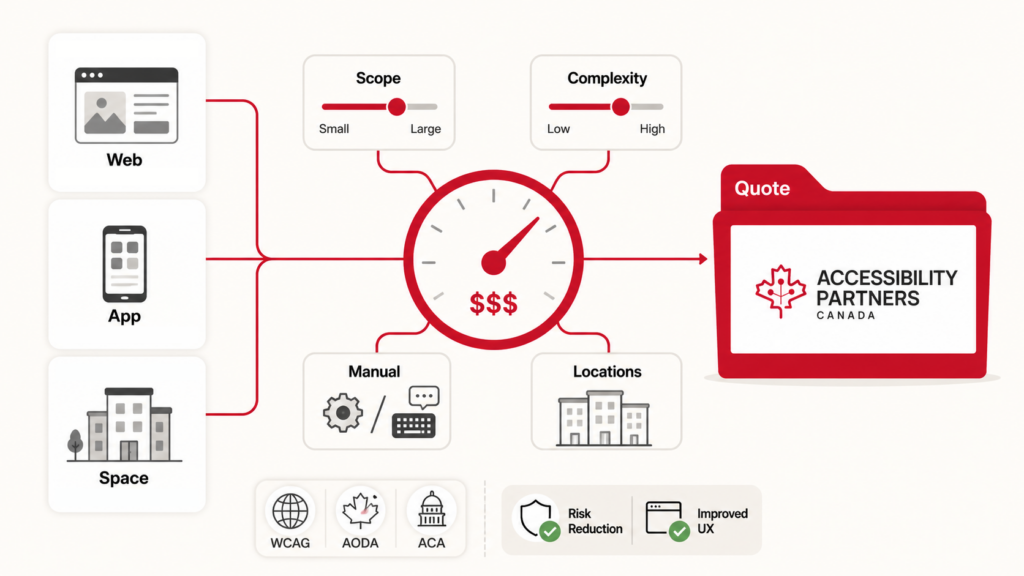
The honest answer is that it depends on what you need tested, against which requirements, and what you need at the end. Two websites with the same number of pages can differ a lot in cost. So can two buildings with the same floor area.
The short answer: most professional digital accessibility audits cost several thousand dollars. Large or complex platforms, audits covering several products, or a portfolio of sites can reach five figures. Built environment audits vary just as widely, mainly with the number and size of sites.
We don’t publish a detailed price list, because a list can’t reflect those differences and usually ends up being wrong for everyone. This guide explains what actually drives the cost, so you can budget sensibly and get a quote that fits.
Two kinds of accessibility audit
This guide covers the two types we’re asked about most often. Their costs are driven by different things.
- Digital audits check websites, web and mobile apps, and documents against a technical standard, usually WCAG 2.2 Level AA.
- Built environment audits check buildings and outdoor spaces against the applicable building code and accessibility standards such as CSA/ASC B651:23, Accessible design for the built environment.
Many organizations need only one. If you need both, or you have self-service kiosks or terminals, see the section on where digital and physical meet.
Whichever you need, a good audit tells you what the barriers are, where they are, how serious they are and how to fix them. It gives you the evidence you need to plan fixes, respond to accessibility requirements and decide where to spend. It also helps identify barriers that may affect the 27% of Canadians aged 15 and over who live with a disability (Canadian Survey on Disability, 2022).
What drives the cost of a digital audit
How much of your site or app is in scope
Page count is a poor guide. Most sites are built from a small set of templates and components, and a barrier in a template shows up on every page that uses it. What matters more is:
- how many distinct templates and components you have
- which key tasks need testing end to end, such as signing up, logging in, searching, filling in forms and paying
- whether documents such as PDFs and Word files are included
- whether mobile apps are included, and on which platforms
We test a representative sample, following the W3C’s evaluation methodology (WCAG-EM), rather than every page. That keeps the cost tied to how complex your site is, not how big it is.
Which standard you’re testing against
WCAG 2.2 AA is a common target for websites and web applications. Some procurements, particularly for information and communication technology (ICT), also require the broader CAN/ASC – EN 301 549:2024 standard, usually because it’s written into the solicitation or contract. It covers software, documents, hardware and support services as well as web content, so there is more to test.
How deep the testing goes
Automated scanning tools are fast and cheap, but they find only some of the barriers WCAG covers. They can’t tell whether alt text makes sense, whether a form can be completed with a keyboard, or whether a screen reader user can follow what’s happening on the page.
A proper audit combines automated scans with manual expert testing, using screen readers, keyboard-only navigation and zoom across an agreed set of browsers and devices. More combinations of browsers and assistive technologies mean more testing time.
Languages
A second language doesn’t double the work. If both languages run through the same templates, many structural barriers show up once and are fixed once. The extra testing covers what the translation touches:
- the page language, and language changes within the page, are set correctly
- alt text, labels and error messages are translated
- captions and transcripts exist in both languages
- the language switcher itself works
Effort climbs toward double only where the second language is produced separately. That usually means documents, video, and pages built outside your main templates.
What you need at the end
An issue report for your developers is the basic deliverable. Some organizations also need an Accessibility Conformance Report (ACR) for procurement, often prepared using a VPAT template, or a formal conformance statement. Each adds to the work, so say up front what you need.
Retesting
Once fixes are in, most organizations want them checked. Retesting can be included in the original scope or quoted separately. Agreeing on it early avoids surprises.
Getting an accurate quote for a digital audit
It helps to send us:
- the URLs, apps or documents to be audited
- the key tasks users need to complete
- the standard you need to meet, if you know it
- the languages your content is in
- whether documents are included, and roughly how many
- what you need at the end: an issue report, an ACR, or both
- whether you want retesting included
- any deadline, such as a contract date or a reporting requirement
What drives the cost of a built environment audit
Number and type of sites
One office floor is a very different job from a campus, a chain of stores or a transit facility. Cost depends on how many sites need a visit, how large each one is and how varied they are. Similar sites, such as branches built to the same design, can often be sampled rather than each audited in full.
What’s in scope
An audit can cover the whole route a person takes, or only certain parts of it. Typical areas include:
- parking, drop-off areas and the route to the entrance
- entrances, doors and vestibules
- interior routes, ramps, stairs and elevators
- washrooms
- service counters and waiting areas
- signage and wayfinding
- emergency exits and areas of refuge
The more areas included, the longer the site visit and the longer the report.
Which requirements apply
New construction and renovations have to meet the building code requirements that apply in that jurisdiction. Codes are adopted and amended differently across provinces, territories and municipalities. Existing buildings are often assessed against a best-practice standard such as CSA/ASC B651:23 as well, since meeting the code in force when a building was built doesn’t mean it’s accessible today. Some organizations also have their own design standards or lease requirements to check against.
What you need at the end
The basic deliverable is a report of barriers with photos, measurements, the requirement each one relates to and a recommended fix, in priority order. Some organizations also want the report organized to feed a capital plan or an accessibility plan. Say up front what you need.
Travel
Sites outside major centres, or spread across several regions, add travel time and cost.
Getting an accurate quote for a built environment audit
It helps to send us:
- the address of each site
- the type and approximate size of each site
- which areas you want included
- floor plans, if you have them
- any planned renovations
- what you need at the end, such as a barrier report or input to a capital or accessibility plan
- any deadline
Where digital and physical meet
Self-service kiosks, ATMs, ticket machines, check-in terminals and digital signage sit between the two kinds of audit. The device has an interface that needs testing, and it stands in a physical space that needs to be reachable.
A useful audit looks at both: the screen, controls, and speech output, audio connections and other hardware features where applicable, as well as the approach, clear floor space and reach ranges around it. CAN/ASC – EN 301 549:2024 covers ICT hardware and software, and CSA/ASC B651.2:25 is the Canadian standard for self-service interactive devices, including automated banking machines, and their sites.
If your organization has both a website and physical locations, you don’t have to audit them together. Some organizations do, so that one report covers the full customer journey, from finding information online to being served in person.
Which laws apply to you
Accessibility obligations in Canada come from several places, and the ones that apply to you affect what an audit should cover.
- Federal. The Accessible Canada Act applies to federally regulated organizations, including the federal government, banks, telecommunications and interprovincial transportation.
- Provincial. Several provinces have their own accessibility laws. Their requirements and timelines differ.
- Human rights law. Federal, provincial and territorial human rights laws prohibit discrimination based on disability and create duties to accommodate within their own jurisdictions. Those obligations exist whether or not a separate accessibility law applies.
- Building codes. For physical spaces, the building code requirements that apply in your jurisdiction govern new construction and renovations.
- Procurement. Public sector buyers often require a specific standard, such as CAN/ASC – EN 301 549:2024, in their contracts.
If you’re not sure which apply, we can help you work that out as part of scoping.
An audit is not remediation
An audit finds the problems. Fixing them is a separate job, and its cost depends on what the audit finds and who does the work. For digital products, that means changes to code, content and documents. For buildings, it can mean anything from new signage to renovation. Budget for the audit and the fixes as two separate things.
Choosing an auditor
For digital audits, look for people who test manually with assistive technologies, not just run a scanning tool. Relevant IAAP credentials include CPACC, WAS and CPWA. For technical web accessibility testing, look particularly for WAS or CPWA.
For built environment audits, look for people who know your building code and current accessibility standards. Recognized credentials include the Rick Hansen Foundation Accessibility Certification (RHFAC) professional designation.
For either, ask to see a sample report and check that its findings are specific enough to act on. Ask how the auditor decides what to test or visit, and what the price includes.
Our team has helped write some of the international accessibility standards we test against, and we’ve audited websites, apps, documents and buildings for public and private organizations across Canada.
Get a quote
Tell us what you need audited and we’ll send you a quote based on your actual scope. Contact Accessibility Partners
Frequently asked questions
It depends on scope. A small website or a single site visit can take a few days, while a large platform or a multi-site review can take several weeks. We give you a timeline with your quote.
Yes. We audit websites, apps, documents and buildings, separately or together.
Audit after major changes, such as a redesign, a new app or a renovation. In between, check regularly so that new content or changes to a space don’t introduce new barriers.
Automated tools are useful for catching some issues quickly, but they miss many barriers that only manual testing finds. They add to an audit; they don’t replace one.
No. A well-chosen sample of templates, components and key tasks gives a reliable picture of the whole site.
Each barrier we find, where it is, which requirement it fails, how serious it is and how to fix it, with a summary for managers and decision-makers.
They help us scope and plan the visit, but they aren’t required.
Usually not. Site visits can be planned around normal operations.
Each barrier we find, with photos and measurements, the requirement it relates to, how serious it is and a recommended fix.
Make your next user journey more accessible.
Turn the findings from your review into a plan your team can act on.
Book a consultation