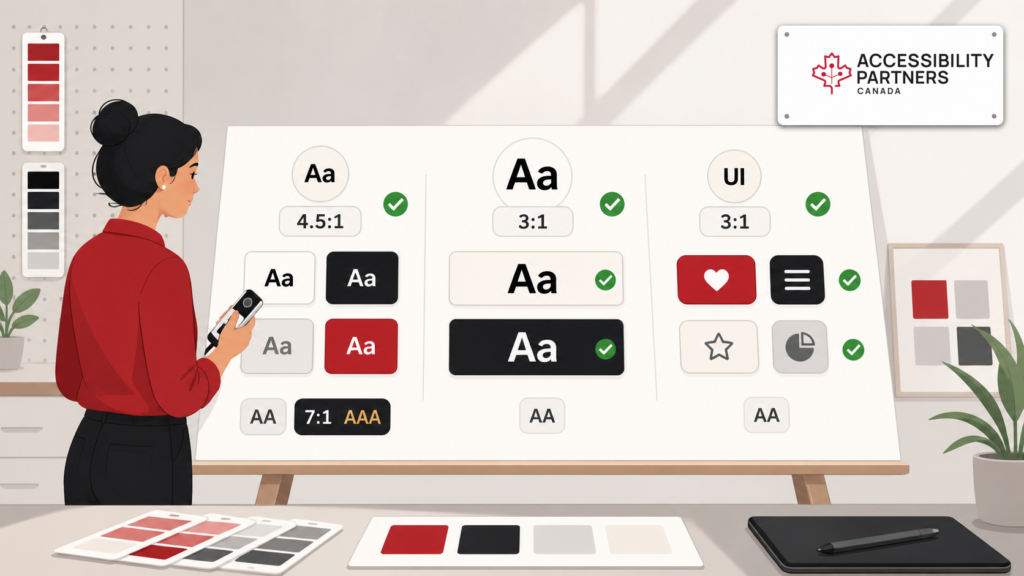
Colour Contrast refers to the difference in brightness and color between foreground (like text) and background elements. It’s essential for people with low vision, color blindness, and other visual impairments, making content readable and usable. Ensuring strong contrast improves inclusivity and aligns with accessibility guidelines like WCAG (Web Content Accessibility Guidelines ), which define three levels of compliance: A, AA, and AAA. While most legal standards require AA compliance (4.5:1), aiming for AAA contrast (7:1) ensures broader inclusion and better usability across devices.
How Colour Contrast Affects Accessibility
WCAG 2.1 outlines specific contrast requirements for different types of content:
- Normal text: Minimum 4.5:1 contrast ratio (AA); 7:1 for AAA
- Large text (18pt or 14pt bold): 3:1 (AA); 4.5:1 for AAA
- Non-text UI elements and graphics: At least 3:1 contrast (AA)
These guidelines matter because poor contrast can make websites unusable for many people. WCAG-conformant design ensures readability, usability, and legal defensibility, contributing to better overall website accessibility.
Understanding WCAG Guidelines for Colour Contrast
Inaccessible contrast isn’t just a vision issue. People with cognitive or neurological disabilities also benefit from clear, high-contrast layouts. Low contrast increases cognitive load, impairs focus, and slows task completion. Supporting cognitive access means using clear visual hierarchies, reducing visual clutter, and ensuring text is distinguishable regardless of background.
Benefits of Following Colour Contrast Accessibility Guidelines
- Enhanced readability for all users
- Improved mobile usability in low-light or glare situations
- Legal compliance under AODA and WCAG standards
- Better SEO and retention via lower bounce rates and increased engagement
- Broader inclusivity for users with vision, cognitive, and situational limitations
In Canada, Under the AODA, the legal requirement is WCAG 2.0 Level AA. Federally regulated organizations follow the Accessible Canada Act framework, which references CAN/ASC-EN 301 549. We test to WCAG 2.2 AA, including sufficient colour contrast for text and UI elements. Organizations operating in British Columbia should also understand how accessibility requirements align with provincial accessibility legislation and training obligations.
How to Test Colour Contrast: Accessibility Contrast Checker Tools
Before publishing, test your design with a contrast checker accessibility tool to ensure it meets WCAG requirements. Reputable options include:
Check links, buttons, text overlays, input fields, and navigation menus – including all hover and focus states.
Best Practices for Selecting Accessible Color Combinations
- Prioritize dark text on light backgrounds (or vice versa)
- Avoid color pairs like red/green, blue/purple, or gray/white without high contrast
- Use visual indicators (like underlines or icons) in addition to color alone
- Test all brand color combinations before using them on critical UI
- Ensure adequate contrast for hover, active, and focus states
High Contrast vs Low Contrast: Choosing the Right Approach
High contrast is generally preferred for accessibility. It uses sharp distinctions in brightness and color to improve visibility, ideal for navigation, body text, and calls to action. Low contrast may work for decorative elements but often compromises readability and clarity.
Use high contrast for critical information, and reserve low contrast for background visuals or less critical content.
Common Mistakes in Colour Contrast and How to Avoid Them
- Relying on brand palettes without testing contrast
- Using similar tones (e.g., pastel blue on white)
- Skipping contrast tests for icons, charts, and hover states
- Ignoring colour contrast in light/dark mode variations
- Failing to test in different lighting or device settings
Always test with a contrast checker and consider creating style guides with pre-approved accessible combinations.
Advanced Techniques for Colour Contrast Accessibility
- Dynamic contrast modes: Use CSS with prefers-contrast or prefers-color-scheme for user-driven theme adjustments
- Non-text contrast: Ensure UI components (icons, focus indicators, chart labels) meet the 3:1 contrast minimum
- Contrast overlays: Use semi-transparent overlays for images to ensure text remains readable
- Accessible dark mode: Choose colors that meet contrast in both light and dark themes
Conclusion: Implementing Strong Colour Contrast for Better Accessibility
Effective colour contrast isn’t just a guideline, it’s the foundation of accessible, user-friendly websites. By following WCAG standards, testing contrast consistently, and prioritizing readability, you make your website usable for everyone, including people with visual, cognitive, and situational limitations. Strong contrast improves engagement, lowers bounce rates, and ensures compliance with accessibility laws like AODA and the Accessible Canada Act.
Ready to make your website fully accessible? At Accessibility Partners, we help businesses implement WCAG-compliant designs, test colour contrast, and create inclusive digital experiences. Contact us today to enhance usability, accessibility, and inclusivity on your site.